LangGraph is an agentic framework for orchestrating complex language model workflows as graphs of nodes and edges. Subgraphs in LangGraph are simply graphs used as nodes within a larger graph. In other words, an entire graph (with its internal nodes and logic) can be encapsulated and treated as a single node in a parent graph. This modular design makes it easier to break down complex workflows into smaller, manageable components. Subgraphs are especially useful for building multi-component AI systems – for example, multi-agent setups and for reusing logic across different workflows.
This article will explore how to define and use subgraphs in LangGraph, including a simple example and a more advanced Retrieval-Augmented Generation (RAG) example with conditional routing.
Installing and Importing Required Libraries
The following script installs the libraries and modules you need to run scripts in this article.
!pip install langchain-community
!pip install langchain-openai
!langchain-text-splitters
!pip install langgraph
!langchain-core
!pip install pypdf
!pip install chromadb
The script below imports the required modules into your Python application.
from langchain_openai import ChatOpenAI
from langchain_openai import OpenAIEmbeddings
from langchain_community.document_loaders import PyPDFLoader
from langchain_text_splitters import RecursiveCharacterTextSplitter
from langchain_core.documents import Document
from langchain_community.vectorstores import Chroma
from langchain_core.documents import Document
from langgraph.graph import START, StateGraph, START, END
from langgraph.checkpoint.memory import MemorySaver
from langchain_core.messages import HumanMessage

from typing_extensions import List, TypedDict
from IPython.display import Image, display
import os

from google.colab import userdata
OPENAI_API_KEY = userdata.get('OPENAI_API_KEY')
A Simple Example of Subgraphs in LangGraph
Let us start with a basic example to illustrate what subgraphs are and how to use them. Suppose we want to build a small Q&A workflow that takes a user question, gets an answer from an OpenAI model, and then suggests a followup question. We will implement this in LangGraph by creating a subgraph that handles the two-step process (answering and suggesting a followup), and then include that subgraph in a parent graph.
We will use the OpenAI gpt-4o model to generate responses to user queries. The script below defines our LLM.
llm = ChatOpenAI(model = 'gpt-4o',
                api_key = OPENAI_API_KEY)
Next, we will define states for our parent graph and the subgraph.
The two graphs have the duplicate keys (query, answer, followup, trace) so that the parent and subgraph share these state channels.
class ParentState(TypedDict):
    query: str
    answer: str
    followup: str
    trace: list[str]


class QASubgraphState(TypedDict):
    query: str            # (shared with parent)
    answer: str           # (shared with parent)
    followup: str         # (shared with parent)
    trace: list[str]      # (shared with parent)
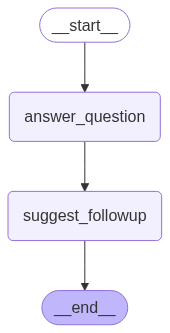
In the subgraph, we will define two nodes as simple Python functions. The first node answer_question uses the LLM to generate an answer for the user's query, and stores it in the state under the "answer" key. The second node suggest_followup question, storing the result under followup.
The two subgraph nodes: answer_question and suggest_followup, and the parent node parent_node will also update the trace list by appending trace messages.
def answer_question(state: QASubgraphState) -> QASubgraphState:
    question = state["query"]
    trace = state.get("trace", [])
    trace.append("subgraph:answer_question")
    response = llm([HumanMessage(content=question)]).content
    return {"answer": response, "trace": trace}

def suggest_followup(state: QASubgraphState) -> QASubgraphState:
    trace = state.get("trace", [])
    trace.append("subgraph:suggest_followup")
    prompt = f"Based on the answer: '{state['answer']}', suggest a relevant follow-up question."
    suggestion = llm([HumanMessage(content=prompt)]).content
    return {"followup": suggestion, "trace": trace}

def parent_node(state: ParentState) -> ParentState:
    trace = state.get("trace", [])
    trace.append("parent:qa_flow")
    return {"trace": trace}
Next, we build and compile the subgraph, then build the parent graph and insert the subgraph as a node:
subgraph_builder = StateGraph(QASubgraphState)
subgraph_builder.add_node("answer_question", answer_question)
subgraph_builder.add_node("suggest_followup", suggest_followup)
subgraph_builder.add_edge(START, "answer_question")
subgraph_builder.add_edge("answer_question", "suggest_followup")
subgraph_builder.add_edge("suggest_followup", END)
qa_subgraph = subgraph_builder.compile()


parent_builder = StateGraph(ParentState)
parent_builder.add_node("parent_node", parent_node)
parent_builder.add_node("qa_flow", qa_subgraph)
parent_builder.add_edge(START, "parent_node")
parent_builder.add_edge("parent_node", "qa_flow")
parent_builder.add_edge("qa_flow", END)

parent_graph = parent_builder.compile()
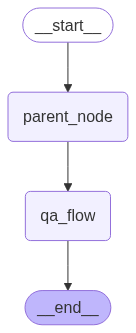
You can see how the parent and subgraph look by displaying them as follows:
display(Image(parent_graph.get_graph().draw_mermaid_png()))
display(Image(qa_subgraph.get_graph().draw_mermaid_png()))
Output (Parent Graph)
Output (Subgraph)
Now we can run the parent graph with an example question:
query = "What is the capital of France?"
result_state = parent_graph.invoke({"query": query})

print("Question:", query)
print("Answer:", result_state["answer"])
print("Follow-up question:", result_state["followup"])
print("Nodes tracing", result_state['trace'])
When you invoke the graph, LangGraph will execute the subgraph as part of the flow. The final result_state returned is a dictionary containing the updated state after the graph finishes. In this case, it should contain the original question, the answer from the LLM, a followup question, and the trace list. For example, you might see:
Output:

The trace list shows the graph execution flow. It shows that the query was first passed to the parent_node, which forwarded it to the subgraph nodes answer_question and suggest_followup.
This simple example demonstrates how a subgraph can encapsulate a multi-step LLM workflow (answering and then suggesting a question). The parent graph doesn't need to know the details of those steps; it just treats the subgraph as a single node that takes a query and produces an answer and followup in the state.
RAG with Subgraphs and Conditional Routing
For a more advanced example, let's consider a Retrieval-Augmented Generation (RAG) scenario. In a RAG application, the system augments the LLM by retrieving relevant documents from an external knowledge base and providing that information to the LLM to improve its answer. We will demonstrate how to utilize subgraphs for the retrieval step and how to route queries to this subgraph only when necessary.
Define the RAG Subgraph
First, we prepare the knowledge base from a PDF. We will use LangChain's document loader and vector store for this.
data_url = "https://northwestcricket.com/wp-content/uploads/2023/04/laws-of-cricket-2017-code-3rd-edition-2022_1.pdf"

loader = PyPDFLoader(data_url)
docs = loader.load()
text_splitter = RecursiveCharacterTextSplitter(
chunk_size=1000, # chunk size (characters)
chunk_overlap=200, # chunk overlap (characters)
add_start_index=True, # track index in original document
)
all_splits = text_splitter.split_documents(docs)
print(f"Document split into {len(all_splits)} sub-documents.")Output:
Document split into 300 sub-documents.embeddings = OpenAIEmbeddings()
vector_store= Chroma.from_documents(
documents=all_splits,
embedding=embeddings
)Now we define the subgraph that performs retrieval and then uses the LLM to answer with the retrieved context. We will define a state schema for this subgraph and the functions for its nodes:
class RagState(TypedDict):
    query: str
    answer: str
    docs: str

def retrieve_docs(state: RagState) -> RagState:
    query = state["query"]
    results = vector_store.similarity_search(query)
    context_texts = [doc.page_content for doc in results]
    state_update: RagState = {"docs": " ".join(context_texts)}
    return state_update

def answer_with_docs(state: RagState) -> RagState:
    query = state["query"]
    context = state["docs"]
    prompt = f"Use the following document excerpt to answer the question.\nDocument: {context}\nQuestion: {query}\nAnswer:"
    answer = llm([HumanMessage(content=prompt)]).content
    return {"answer": answer}
Here, RagState includes query and answer (which will be shared with the parent graph's state) and a docs field to hold the retrieved text (this is used internally by the subgraph only). The retrieve_docs node uses our retriever to get relevant chunks from the document and joins them into a single string. The answer_with_docs node then constructs a prompt that includes the retrieved document text and the question, and calls the LLM to produce an answer. The answer is stored in the "answer" key of the state.
Now we build the RAG subgraph:
rag_builder = StateGraph(RagState)
rag_builder.add_node("retrieve", retrieve_docs)
rag_builder.add_node("answer", answer_with_docs)
rag_builder.add_edge(START, "retrieve")
rag_builder.add_edge("retrieve", "answer")
rag_builder.add_edge("answer", END)
rag_subgraph = rag_builder.compile()
display(Image(rag_subgraph.get_graph().draw_mermaid_png()))
Output:
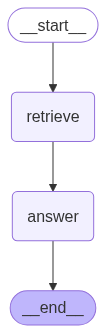
The above graph can be invoked as a standalone graph, as the following script shows.
result = rag_subgraph.invoke({"query": "What is the law to take tea when a team is 9 wickets down?"})
print(result['answer'])
Output:

Define the Direct Answer Node
Next, we create a simple node for the direct answer path (when we decide retrieval is not needed). This node will call the LLM directly on the query. We also define the ParentState for our main graph, which in this case contains a query, answer, and category. The category stores a string that defines whether we need to call the RAG subgraph or the parent node.
class ParentState(TypedDict):
    query: str
    answer: str
    category:str

def direct_answer(state: ParentState) -> ParentState:
    question = state["query"]
    response = llm([HumanMessage(content=question)]).content
    return {"answer": response}
Routing Logic with a Conditional Edge
To decide which path to take for a given query, we introduce a router node route_decision and a router function router_node. The routing_decision The routing_decision function passes the input query to an LLM to decide whether to send this query to the RAG subgraph or process it directly. The returned value (rag or direct) is stored in the category attribute of the graph. The router_node returns this value.
We will use the route_decision and router_node in a conditional edge in our graph to select whether to answer the query using the subgraph or the direct parent node.
def router_node(state: ParentState) -> ParentState:
    return state["category"]


def route_decision(state: ParentState) -> str:

    question = state["query"]
    routing_prompt = f"If the question is about cricket sport, return `rag`, else return `direct`. Question: {question}. The answer should be a single word."
    analysis = llm([HumanMessage(content=routing_prompt)]).content
    decision = analysis.strip().lower()

    print(f"=========== The query is routed to =========== : {decision}")
    if "rag" in decision:
        return {"category": "rag"}
    else:
        return {"category": "direct"}
Define the Parent Graph
Finally, we put everything together in the parent graph:
parent_builder = StateGraph(ParentState)
parent_builder.add_node("router", route_decision)
parent_builder.add_node("direct", direct_answer)
parent_builder.add_node("rag", rag_subgraph)

parent_builder.add_edge(START, "router")
parent_builder.add_conditional_edges(
    "router",
    router_node,
      {"rag": "rag",
       "direct": "direct"}
)

parent_builder.add_edge("direct", END)
parent_builder.add_edge("rag", END)

parent_graph = parent_builder.compile()
display(Image(parent_graph.get_graph().draw_mermaid_png()))
Output:
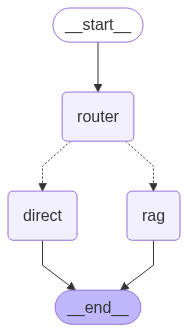
The above image shows our graph structure.
With the graph compiled, we can test it out on different queries:
q1 = "How do I reverse a string in Python? Give only one method."
q2 = "What is the rule to call stumps when a team is 9 wickets down?"

for q in [q1, q2]:
    result = parent_graph.invoke({"query": q})
    print(f"Q: {q}")
    print(f"A: {result['answer']}\n")
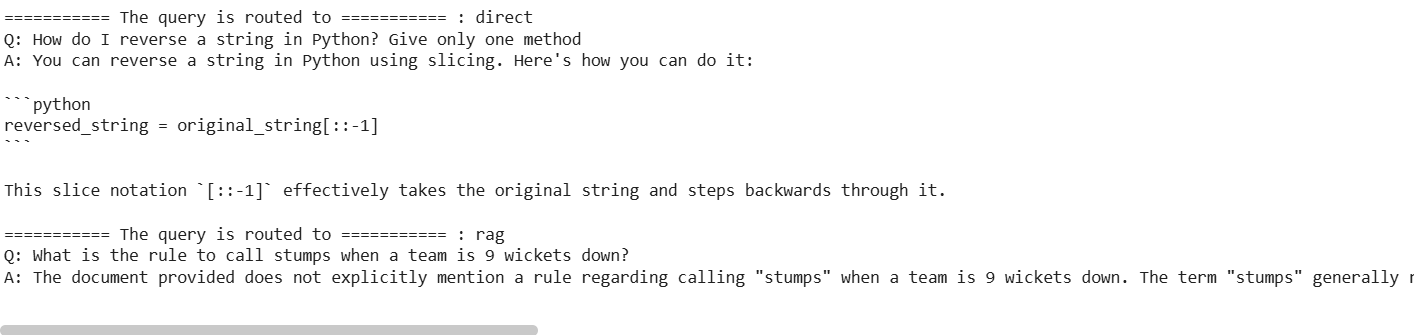
In the first query q1, the question is a general programming question. The routing function will probably determine this can be answered directly.
For the second query q2, the phrasing "wickets down" strongly suggests that we need to consult the PDF, as this term is related to the sport of cricket.
The below output confirms our assumption.
Output:
Conclusion
Subgraphs in LangGraph provide a powerful way to structure complex LLM applications. By encapsulating related nodes into reusable components, subgraphs help in managing state across multi-step operations and keeping the overall graph organized.
With a good understanding of subgraphs, you can confidently build more complex LangGraph applications, orchestrating sophisticated behaviors such as tool use, multi-step reasoning, and dynamic decision-making in your LLM-powered systems. Happy graph building!