Hi All,

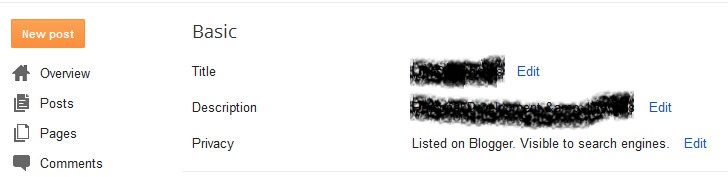
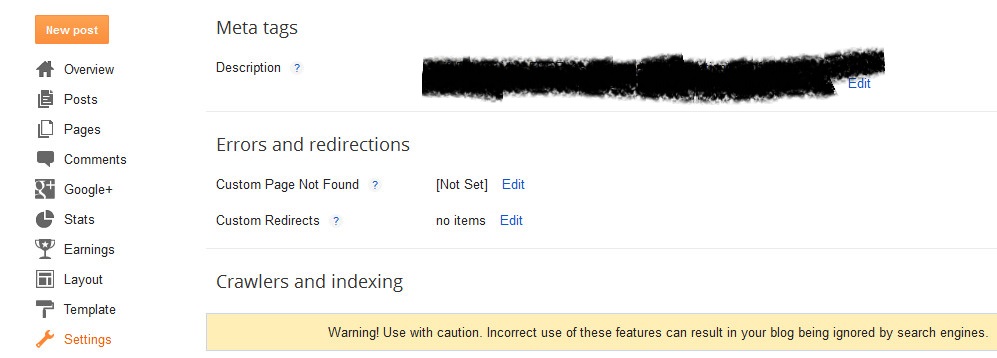
i have been struggling with getting the "Description" text as an additional search engine meta.Am refering to the "Description" which is displayed below the title of the Blog. The "Meta tag Description" is showing up.
please see attachment to better understand what am refering to.
299d4673a5ffe0915db1fc20bc3016ed2c0874385efed66354747986000484d2

Dani AI

Generated

Short expert summary and a practical fix tied to the thread:

Blogger uses two different values: the visible site "Description" that themes show under the blog title, and a separate meta description that search engines may use for snippets. ’s observation (and the workaround of putting text into an image) highlights that those are not the same field. The Blogger dashboard provides a Search Preferences area for search-related meta settings introduced to handle this exact gap. (blogger.googleblog.com)

Recommended, reliable approach (keeps the header text visible while giving crawlers a proper snippet):

  • Enable the Search Description / Meta Tags option in Settings (Search preferences) and set a blog-level description.

  • For each post, fill the post editor’s Search Description field so pages get unique meta descriptions.

  • If a custom template omits the dynamic meta tag, add a template snippet that pulls Blogger’s metaDescription into the head (always back up the template before editing). Example dynamic tag pattern:

    <b:if cond='data:blog.metaDescription != ""'>
      <meta expr:content='data:blog.metaDescription' name='description'/>
    <b:else/>
      <meta expr:content='data:blog.pageName + " - " + data:blog.title' name='description'/>
    </b:if>

This pattern (and variations) is the standard way to surface the Search Description into the HTML head for both homepage and post pages. (stackoverflow.com)

Verification and troubleshooting:

  • Confirm with "View source" that a <meta name='description'> tag appears on the home page and on individual post pages.
  • Use Google Search Console’s URL Inspection to test and request re-crawls of changed URLs when necessary (indexing is not instantaneous). Bear in mind Google will sometimes replace a supplied meta description with a snippet from page content if that better matches the query. (searchengineland.com)

Notes and caveats:

  • Text embedded inside images is not a substitute for HTML text (search engines and accessibility tools rely on HTML and alt text). ’s reminder about content quality is also central: meta descriptions help CTR but quality content and clear page text drive indexing and relevance. (developers.google.com)

Recommended Answers

All 6 Replies

Hmmn... I am not clear what is happening.

I have a blog on Blogger (see my Profile) and it displays the Description as expected. Under the name of my blog, it correctly displays the description, "Living a quiet life in Coquitlam, B.C."

Is yours not displaying at all?
If you delete the Meta tag description, does it then display properly?
If you re-add the Meta tag description, does it overwrite the main description?

If you right something on description tag then when someone search your blog on Google then the description shows there.

yes correct discription is important point your blog should be shown in google.

thanks all for the replies.
i played with blogger settings for around 4 hours & got an acceptable solution.

I noticed the META TAG DESCRIPTION and the DESCRIPTION are 2 different things:

META TAG DESCRIPTION = used by search engines & crawlers.important in SEO.it is the snippet of text that appears in search results.

DESCRIPTION = Displayed under the title of a blog but not used by crawlers.

I wanted the DESCRIPTION to appear when crawlers scan my blog.

So this is what i did to my blog:
1.combined TITLE+DESCRIPTION as TITLE
2.i placed a header image with TITLE on first line & DESCRIPTION on second line

Google has no problem indexing Blogger posts. I have a blog with Blogger, and I have blog posts that rank very well in their keywords

The problem with your blog is the quality of content.

Thanks, CooAtt. Your answer is so helpful for me. I was in a same problem. I just make the description and the meta tag description same.

Be a part of the DaniWeb community

We're a friendly, industry-focused community of developers, IT pros, digital marketers, and technology enthusiasts meeting, networking, learning, and sharing knowledge.